
E7 Licence in real life
Microsoft licensing pages are marketing — until you've actually switched a licence on in your own tenant and used it for real, you don't actually know what it does.
E7 license is specifically formulated to enable powerful governance and management of AI agents as ‘Digital Workers’ but does it? I’m exploring it and stress testing not just the technology but also how it fits in your organisation and operating model.
The challenge with implementing AI in an enterprise is not about building shiny use cases to demonstrate value, it’s about having effective AI Governance that enables, rather than squashes, usage when rules meet messy human reality. To make AI stick it needs to be considered from a platform, process, and people perspective,
What I’ve seen is that there are a lot of people writing about E7 and the tools it provides without having got hands on and understanding how this comes together in an operating model that involves multiple admin and security teams and integrates with the teams building and managing solutions.
I want to build that experience and credibility - At $99 per person per month it’s not a small personal investment but one I wanted to make to ensure I’m at the forefront of AI governance and can speak from a voice of authority and experience to help everyone understand the challenges better.
E7
In March 2026 Microsoft a new enterprise license - the E7 license - It reached ‘General Availability’ GA for organisations to buy and use on the 1st May… But what is it? What does it do? Who actually has it and has used it…. Me!
This weekend I set up a new Microsoft tenant, I bought an E7 license, configured my tenant, turned on functionality, planned what I want to do, and started experimenting! Over coming blog posts I’m going to share this journey and my experiences and my learnings.
So, firstly… What is the E7 license and why was I excited by it and wanted to explore it with freedom.
You can read Microsoft’s description of it and which other licenses it contains here - https://www.microsoft.com/en-us/microsoft-365/enterprise/e7
How I’ve understood it is like this :
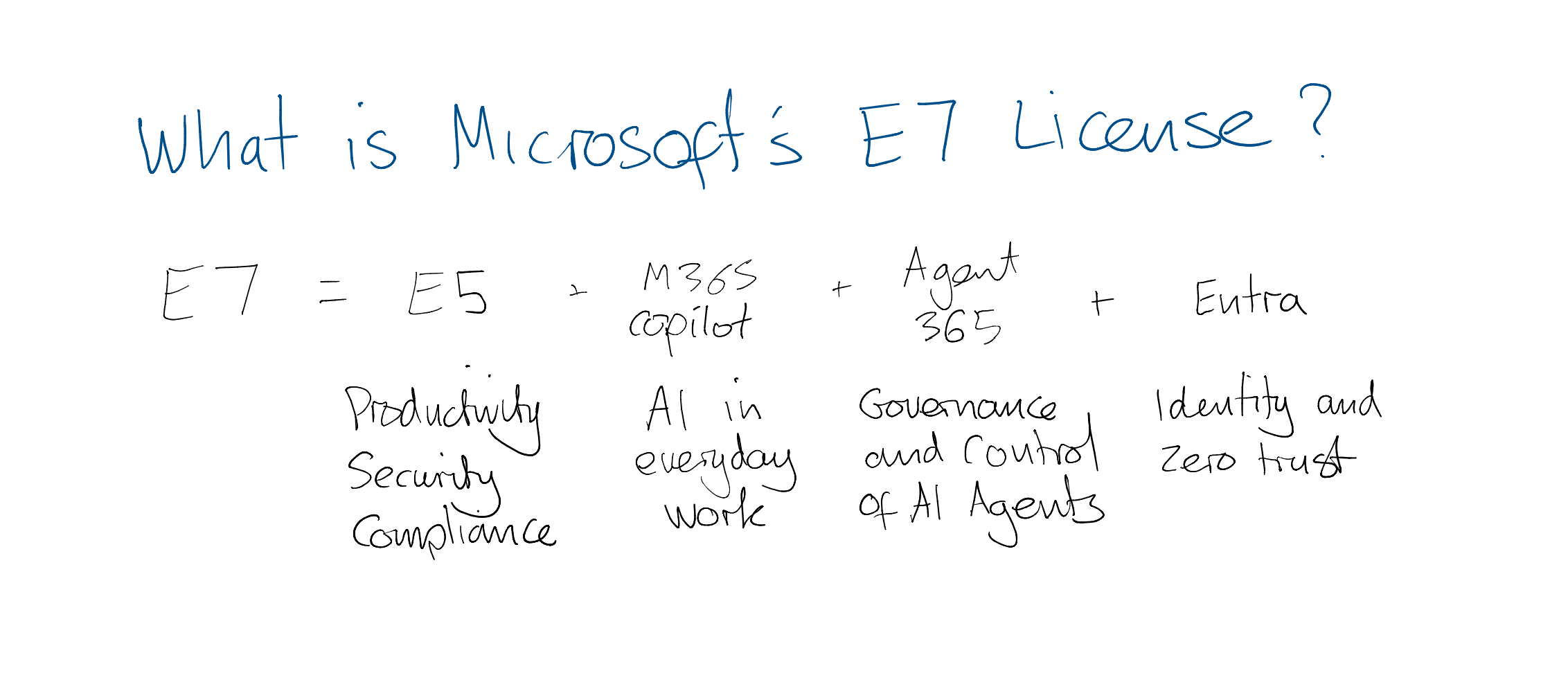
High level view of the components of the E7 license
It’s base is the E5 license which includes tools like Microsoft 365 (formerly Office), Defender, and Purview.
On top of this it packages it with M365 Copilot to provide AI within the first party Microsoft apps and provide some standalone ways of working too (as I explored in this previous blog post - https://www.empoweryour.world/blog/when-to-use-each-type-of-copilot)
It also provides Agent 365 which provides a single pane through which agents from various sources can be governed and managed - https://www.microsoft.com/en-us/microsoft-agent-365
And Entra for identity management and providing agents with their own ID like a human worker.
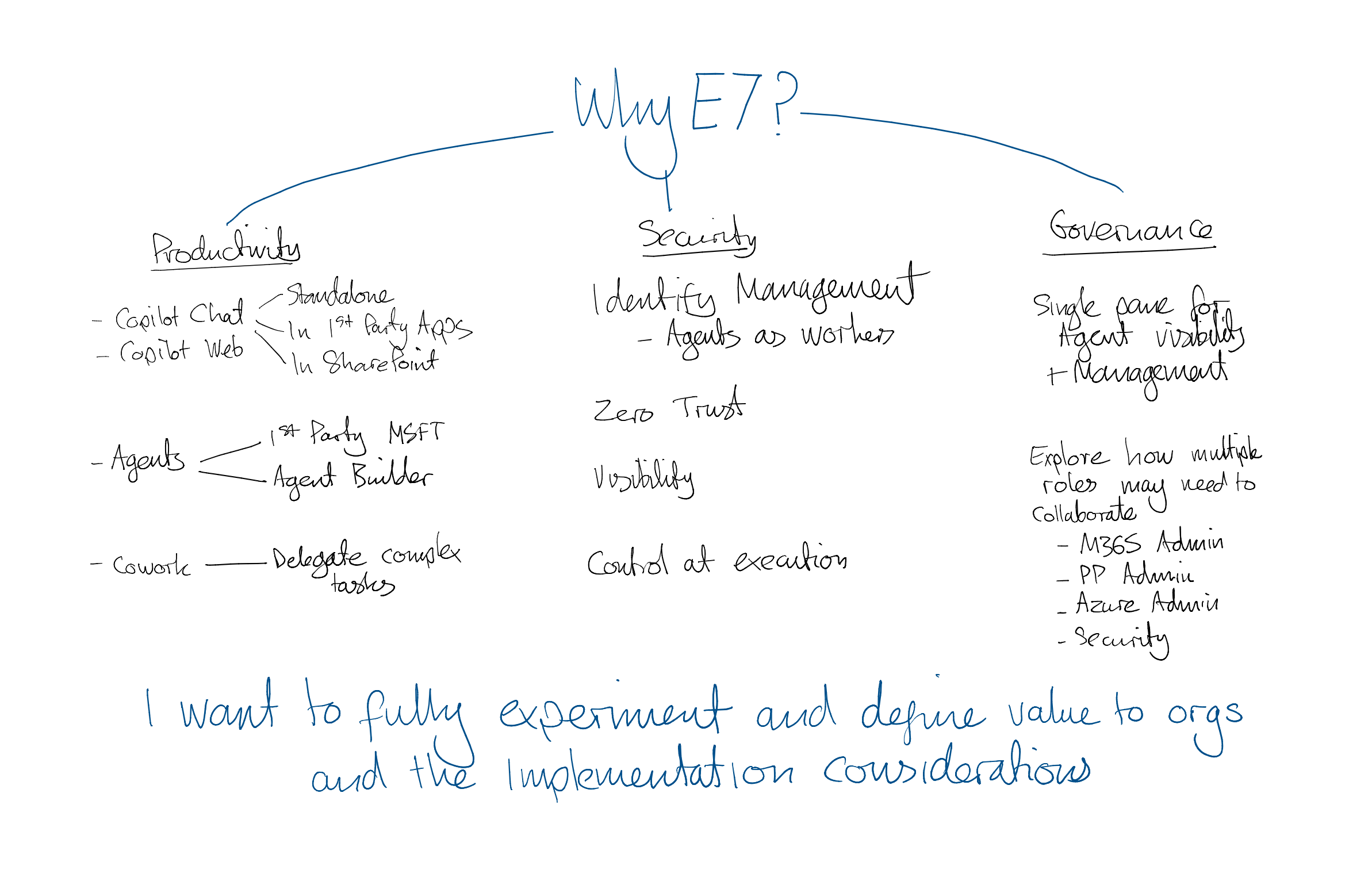
Breakdown of why I wanted to buy the E7 license
So why did I want to invest in the E7 license myself? Essentially - I want to learn, experiment, understand, and invest in my education and effectiveness. There is a lot of talk about E7 and Agent 365 and I wanted to be able to speak about it from a position of authority.
So why might an organisation want to invest in E7 licenses instead of E5?
Productivity - Copilot is increasingly becoming an expectation of employees - We are all using AI outside of work more and more and expect to be able to use it in work too - Bundling M365 Copilot with the M365 suite of tools feels logical.
Security - If we’re enabling people with AI and encouraging them to build agents on the data they have access to we need to have better visibility and control over how well that data is being used and where it’s going - A no brainer.
Governance - As we learned from our Power Platform journey we need to be able to provide the right platform controls, processes, and people knowledge and capability to ensure that we’re using these tools and our data sensibly - Agent 365 gives us that not just from an M365 Copilot perspective but also for agents built in Copilot Studio, Foundry, and other platforms. A single control pane.
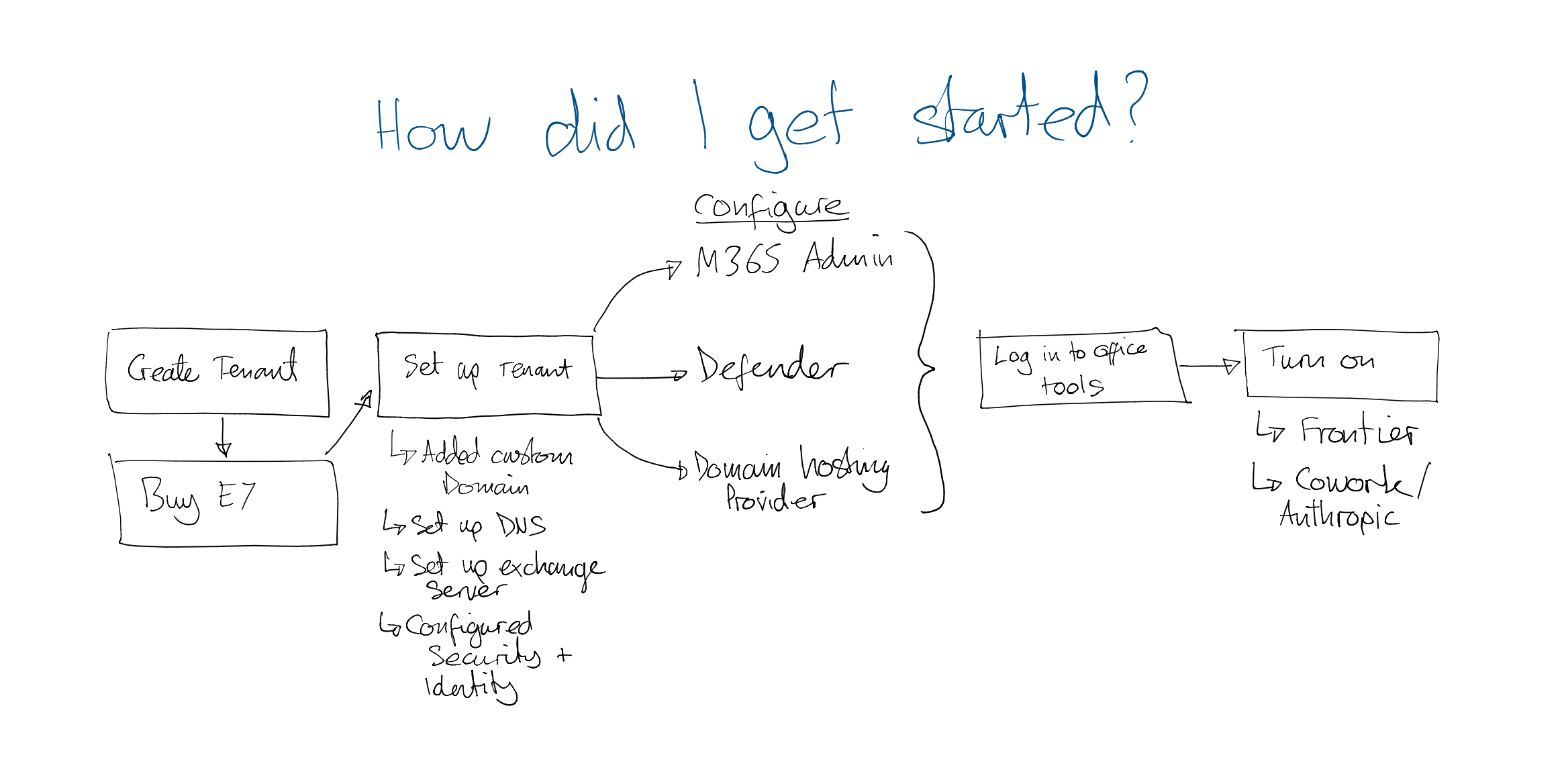
How did I get started with my tenant and E7 license
To get this running I followed these steps:
I created a new Microsoft tenant by requesting a trial E3 license - https://go.microsoft.com/fwlink/?linkid=2249967&clcid=0x809&culture=en-gb&country=gb
I then bought an E7 license from within the M365 Admin Centre and applied it to my account (and remembered to cancel my E3 Trial so I’m not surprised with a charge!)
I wanted to use my EmpowerYour.World domain name on my tenant for Email so I had to go through a number of steps to assign the domain name and then set up my DNS settings to forward traffic and email to the right place - If you haven’t got a domain name then you won’t need to do this, you’ll otherwise have an address like YourChosenDomain.onmicrosoft.com.
I configured some security on my tenant (E.g. MFA, break-glass admin account, Conditional Access, Email security.)
I logged into some of the Microsoft 365 tools (e.g. Copilot, One Drive, Outlook, Teams, Word) to set them up with my new account.
Turned on Frontier to enable new features that aren’t generally available (like some of the new Copilot first party agents including ‘Cowork’) - Get Started with Frontier for Business Users | Microsoft Frontier as well as enabling use of Anthropic to experiment with Cowork - However be aware that doing this means that data is then processes outside of the EU Data Boundary - Anthropic as a subprocessor for Microsoft Online Services | Microsoft Learn - This may be a concern for public sector, highly regulated, or organisations with highly secure or sensitive data. Not everyone will be comfortable with doing this.
So what am I going to do next with my shiny new E7 license?
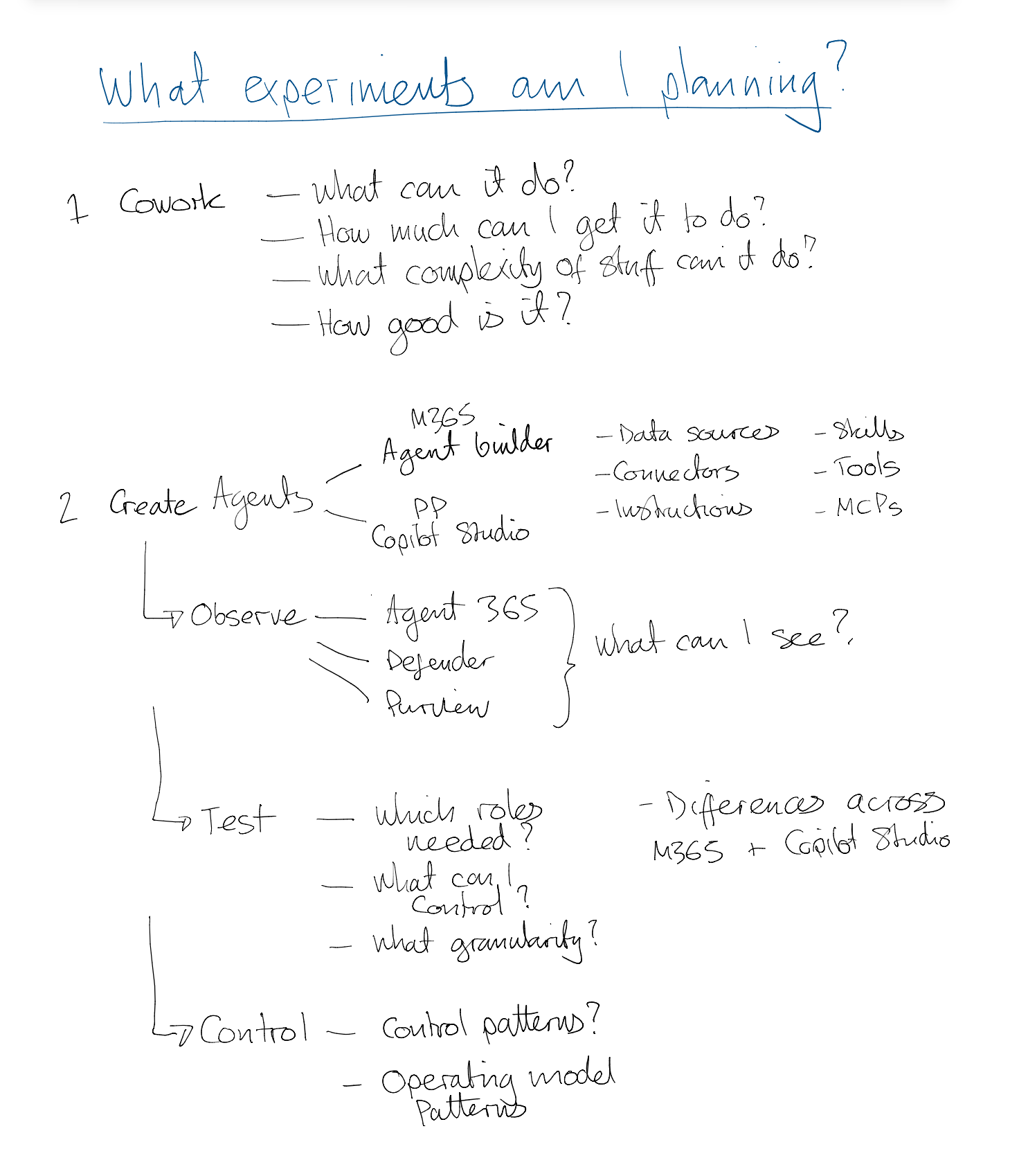
Overview of experiments to leverage the functionality and the operating model to govern it
I’ve already started experimenting with Cowork to see what it’s all about, how well it works. My initial thoughts… WOW! This is what actually springs to mind with the name ‘Copilot’ - It feels incredible now and I can only begin to imagine what this will be like as it develops over the coming months and years! Transformational and hugely disrupting!
For other experiments I want to start building some agents in my tenant with various architectures and configurations, and start to play with Agent 365, defender and purview to understand better what can I see, what role permissions can see or do different things - If I’m an M365 Admin, or a Power Platform Admin, or an Azure Admin, or a Security Admin what can I see and do and how will these roles need to work together to govern the whole estate of agents from various sources which ensuring people can be productive and solve problems.
The organisations that succeed with AI at pace and scale will not just be thinking use cases and solutions. They’ll be thinking how they have an effective governance foundation on which they can redesign their processes and organisation, and then bring that value to life through use cases - and weave people and organisational change through it. The E7 aids with the technology and governance piece but isn’t the whole answer.
To get to these answers I’m going to write blogs to report back on my experiments and these elements and share my learnings, perspectives, and proposals for how this will influence and shape your organisational governance.
What do YOU want to understand about E7, Agent 365, or any of the other capabilities?
