
Copilots in the Flow of Work - But when?
There isn't "a Copilot" — there are four (Structured, Targeted, Delegated, Directive), and confusing them is the reason your rollout feels louder than your results.
Over the last 3 years AI, and Microsoft’s tooling has grown at accelerating pace. It’s amazing what it can do, with lots of crossover in capabilities. As a result it can be confusing which Copilot is best used in which scenario. I was recently in a Microsoft conference session where there was a lot of discussion as to different types of Copilots and in what scenarios they would be used.
The types of Copilots we were talking about were:
In-App Copilots like in Dynamics 365 where Copilot is in a sidebar focused on a specific process - FAQs about AI capabilities in Dynamics 365 - Dynamics 365 | Microsoft Learn
M365 Copilot in it’s own chat experience window or in the Microsoft Office tools - What is Microsoft 365 Copilot? | Microsoft Learn
Copilot Cowork where agents can be tasked with complex multi-step problems - Copilot Cowork: A new way of getting work done | Microsoft 365 Blog
Bespoke agents created for specific tasks in Agent Builder, Copilot Studio, or Microsoft Foundry - Agent Builder in Microsoft 365 Copilot | Microsoft Learn & Microsoft Copilot Studio vs. Microsoft Foundry: Building AI Agents and Apps | Microsoft Community Hub
We were a room of technology experts, leaders, and consultants, and so conversation then turned to considering how we will help our clients understand the difference between the Copilots and where and how they’re used. I spoke with Microsoft product group members to clarify my thinking and tried to create a simple view to help people understand.
Below I’ve described my understanding, and interpretation, of the different uses, supporting data sources, and types of Copilot for different types of work.
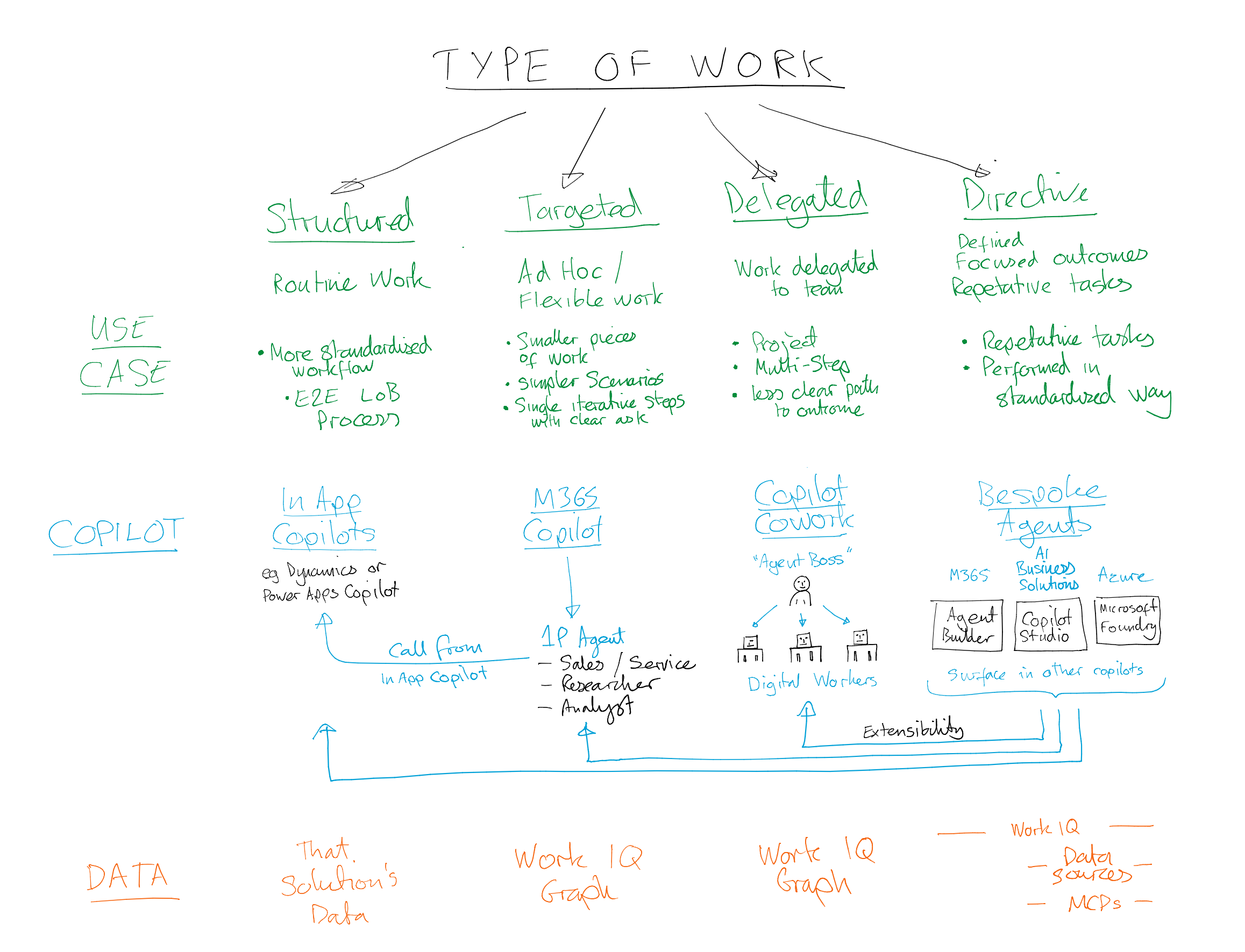
Flow chart showing how different types of work are best served by different types of Copilot
In App Copilots is a partner whilst using first party apps like Microsoft Dynamics where a user would supplement the standard user interface with the added assistance and UI/UX of interacting through Copilot in the sidebar of the window. Copilot providing additional support in those structured, standardised and routine processes.
M365 Copilots is a tool that acts more as a colleague for targeted questions and tasks where the interaction is more of a conversation with specific asks, questions, or outcomes, at each step of the conversation.
Copilot Cowork is a tool to handle complex multi-step requests like you would if delegating a project to a human worker. Describing the outcome that you’re trying to achieve and what inputs you know and relying on the Cowork-er to design and execute the multiple steps to explore the task and decide how to do it.
Bespoke Agents are tools that are developed either through no-code, low-code, or full code, for a specific and defined outcome and task where there’s a good understanding of what the inputs will be, the type of processing that’s needed, and the shape of the outcomes that are expected from the agent.
Below I’ve brought this to life with some simple examples and visualisations of the different Copilots and their usages.
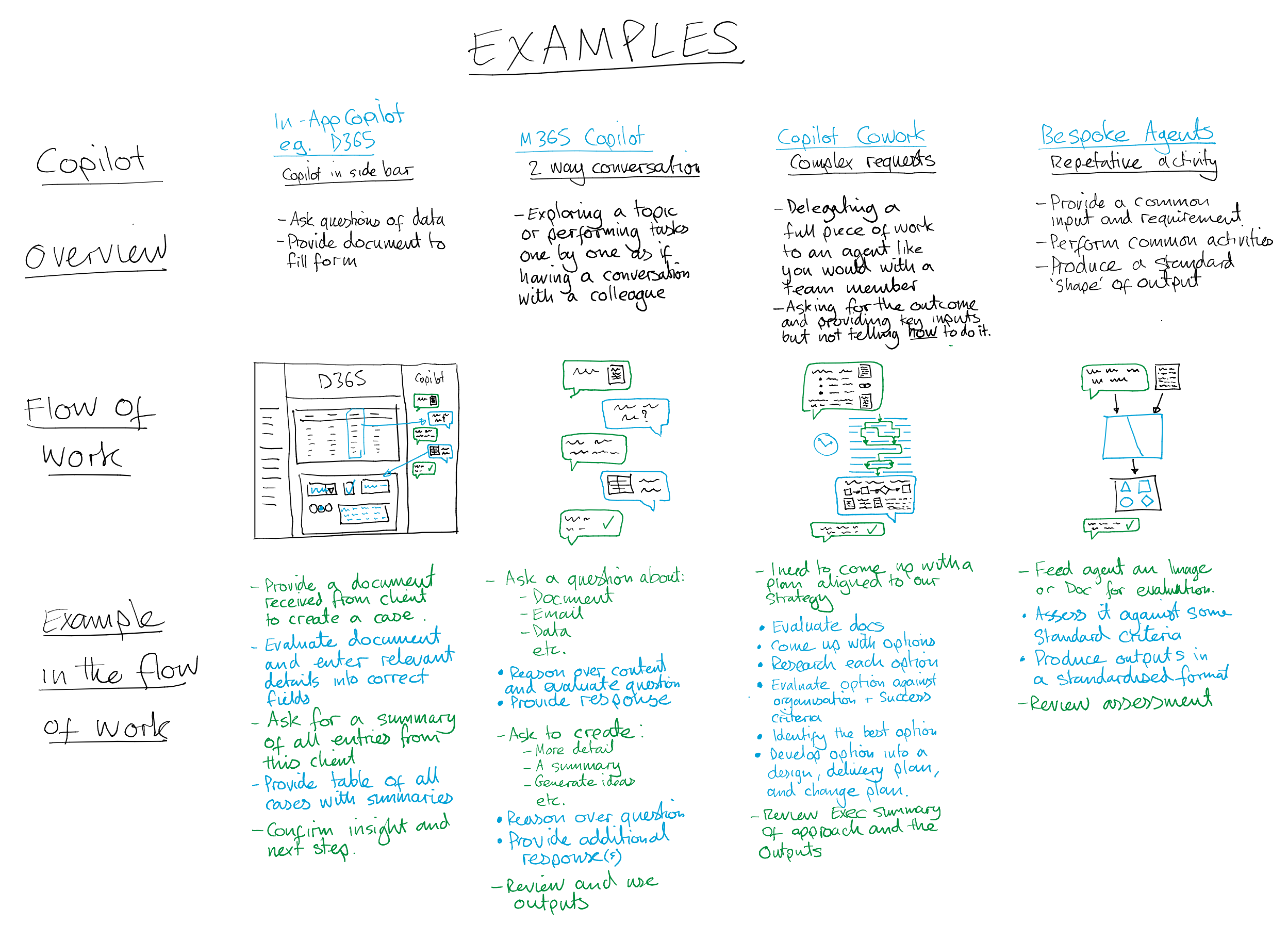
Examples of how the different Copilots can use their strengths for different types of work
This is a simplified view of how the different Copilots can be used for different types of use case as an introduction to exploring them further and embedding them in your ‘flow of work’ - In reality there is overlap between these - for example bespoke copilots can be used to extend the functionality, capabilities, and data sources available through connectors and MCP servers. See below to explore these in ‘Battle Card’ form to explore each scenario.
We can then turn this into a simple model to give us a framework to assess where these different Copilots might sit when assessing a use case’s level of Automation and Complexity as related to connectivity into Enterprise data and systems.
The choice of Copilot isn’t about features—it’s about how much context it has and how much autonomy it needs:
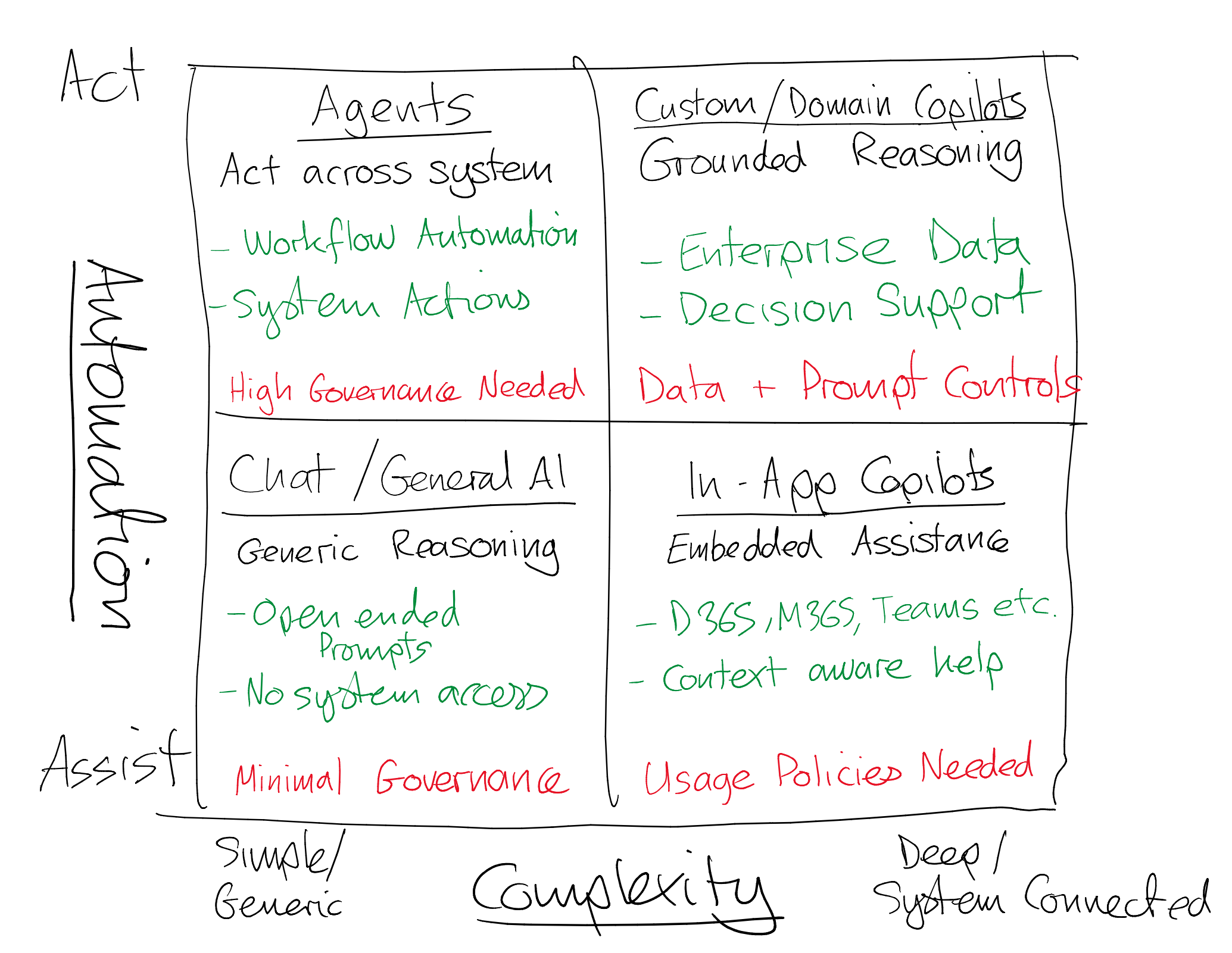
The Copilot Pattern Selection Framework
As we move from Assistance to Autonomy, and simple generic use to deeply enterprise connected use governance must scale accordingly - this is where my Scalable Governance model is essential - https://www.empoweryour.world/blog/scalable-governance-v2
As autonomy increases → governance must increase
As integration increases → data risk increases

Mapping of Copilot types to Scalable Governance Model
Where many organisations go wrong with their adoption journey is jumping in straight from ‘We have Copilot’ to ‘Let’s build agents’ without understanding task complexity, data readiness, and governance requirements and so hit roadblocks and barriers when it comes to productionalising their AI experiments.
To combat this a maturity journey can be built around the The Copilot Pattern Selection Framework to progressively to build capability, understand use cases and some of the challenges associated with them, and increasing complexity over time.
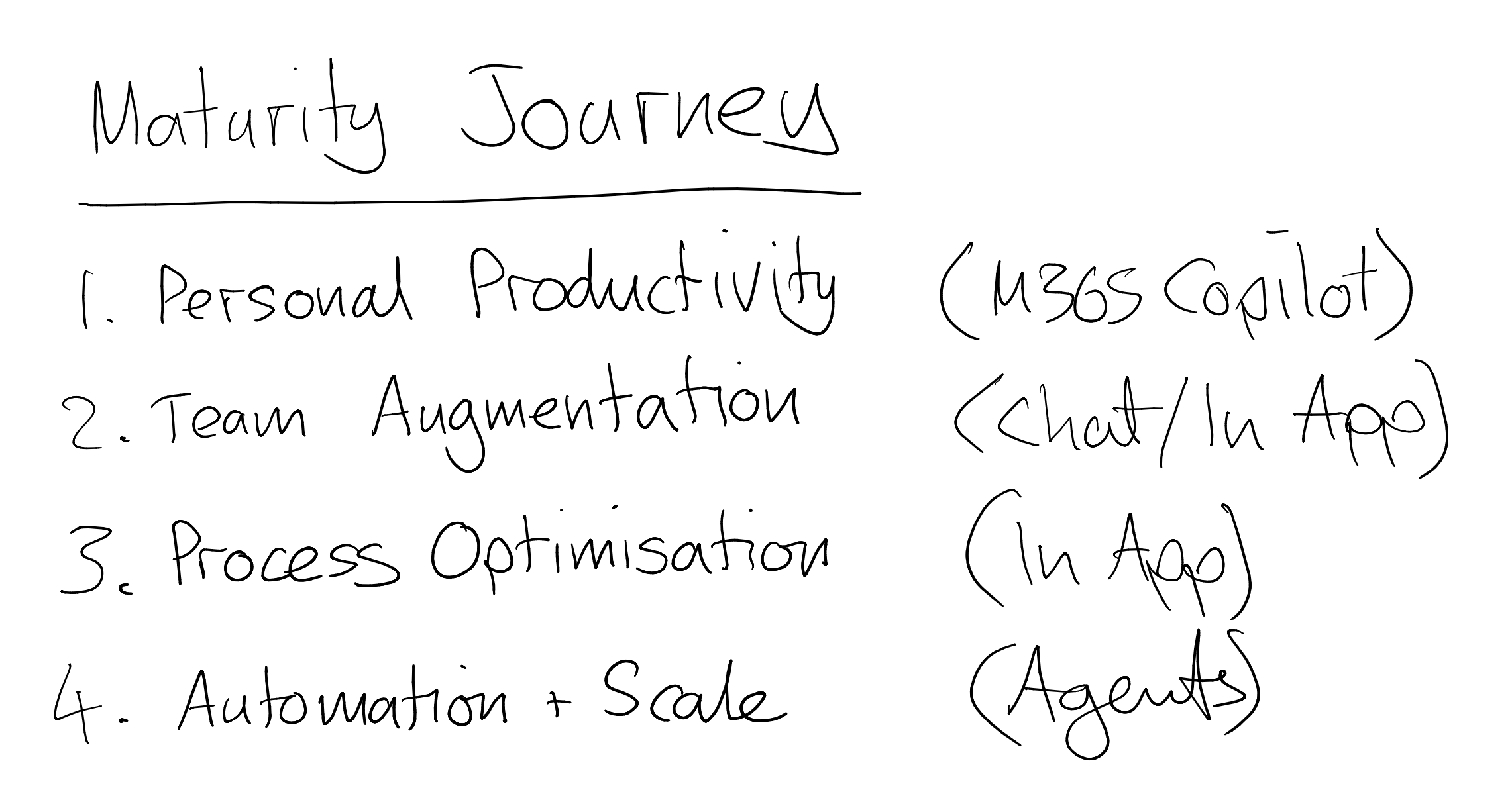
Copilot adoption maturity journey
Most organisations aren’t struggling with starting their AI journey. They’re struggling to recognise and choosing the patterns and set an appropriate vision and strategy. And that is where value is won or lost. Those getting it wrong are:
Overusing agents = risk + cost
Underusing copilots = missed value
Wrong pattern = failed adoption
To combat this we need to understand how to use the right Copilot pattern for what we’re trying to achieve, have the right supporting governance to keep the organisation’s people and data safe and secure whilst enabling value, and have the capability and expertise to operate in this rapidly evolving world!
The organisations that succeed won’t be those who deploy the most AI—but those who know when to assist, guide, or automate.
If you want to be successful the path is clear - Start with Chat. Scale through in-app copilots. Ground with domain copilots. Automate with agents — when you’re ready.
The future
The future changes coming from the Microsoft road map will also mean that this agentic world will further evolve. As these different solutions will be surfaced and governed through M365 Admin Centre (and Agent 365), Power Platform Admin Centre, and Azure Control Plane, there will also be considerations as to the governance operating model and security of each of these approaches which will be further complicated as the boundaries between elements of the Microsoft platform become blurred. Expect to see more blog posts on these challenges in the future!
Check out my other Blog Posts HERE to learn more about different aspects of Copilot, AI, and implementing Governance Operations to enable value in your organisation
Battle Card View
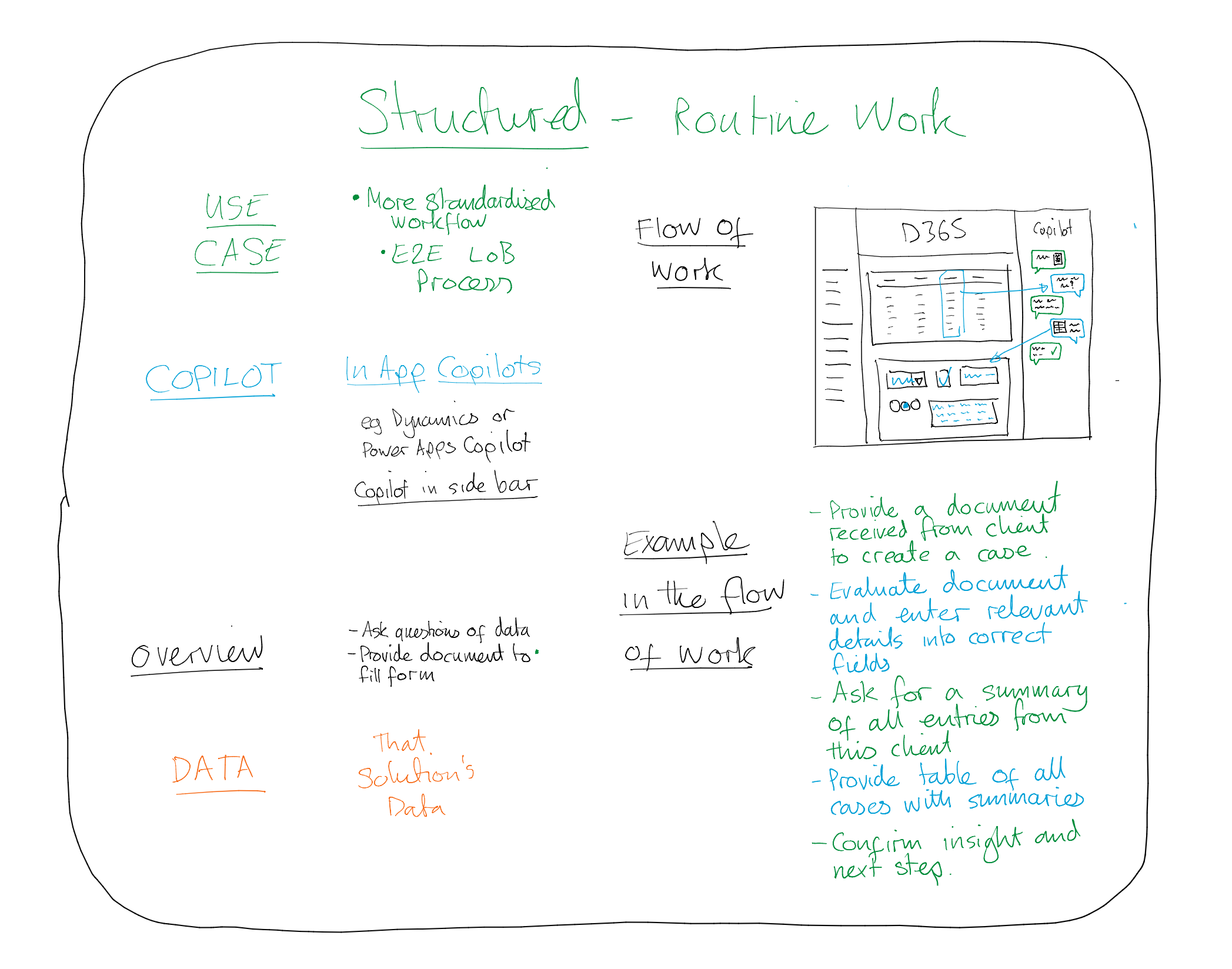
Battle card - Structured Use Case - In App Copilots
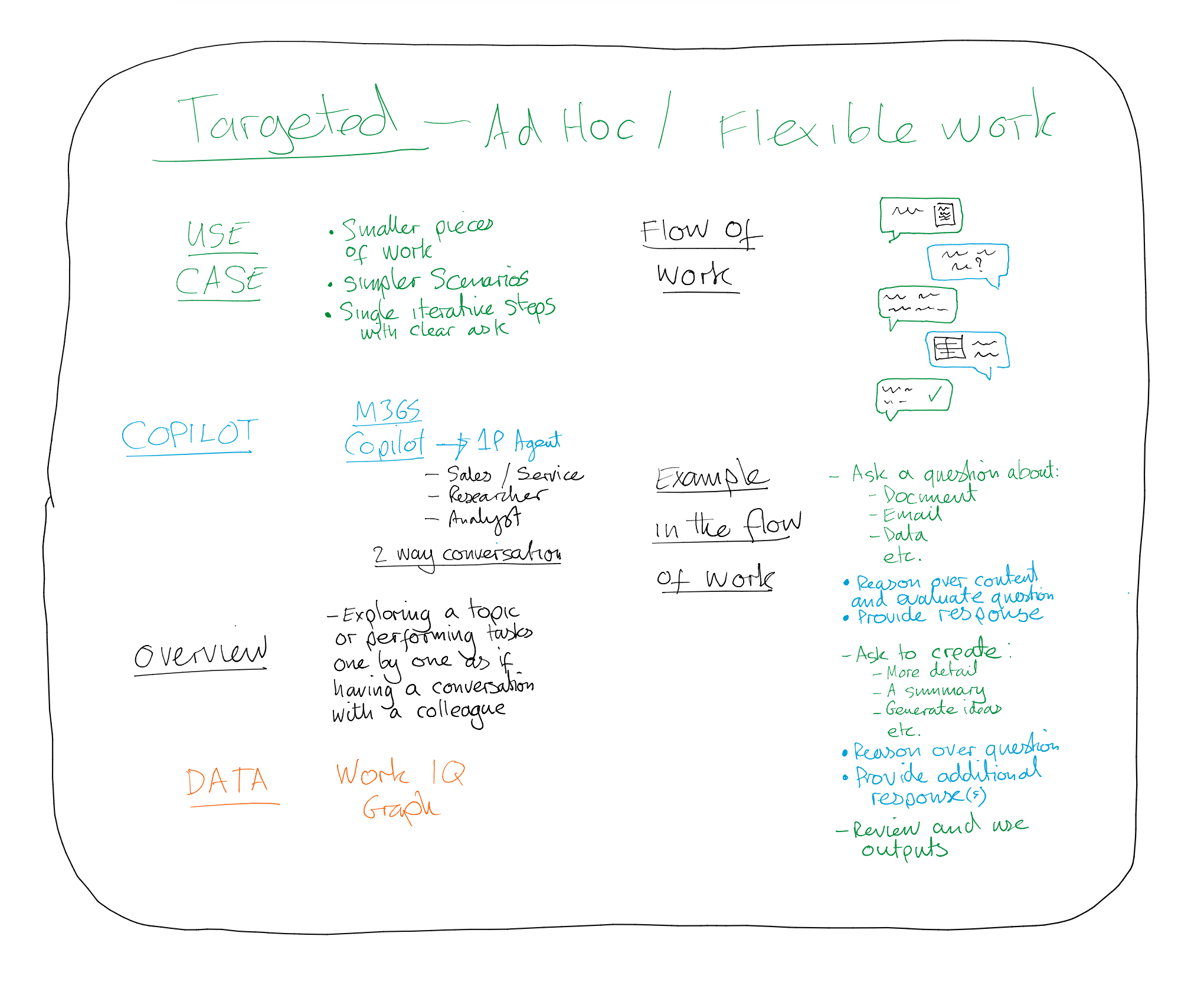
Battle card - Targeted Use Case - M365 Copilot
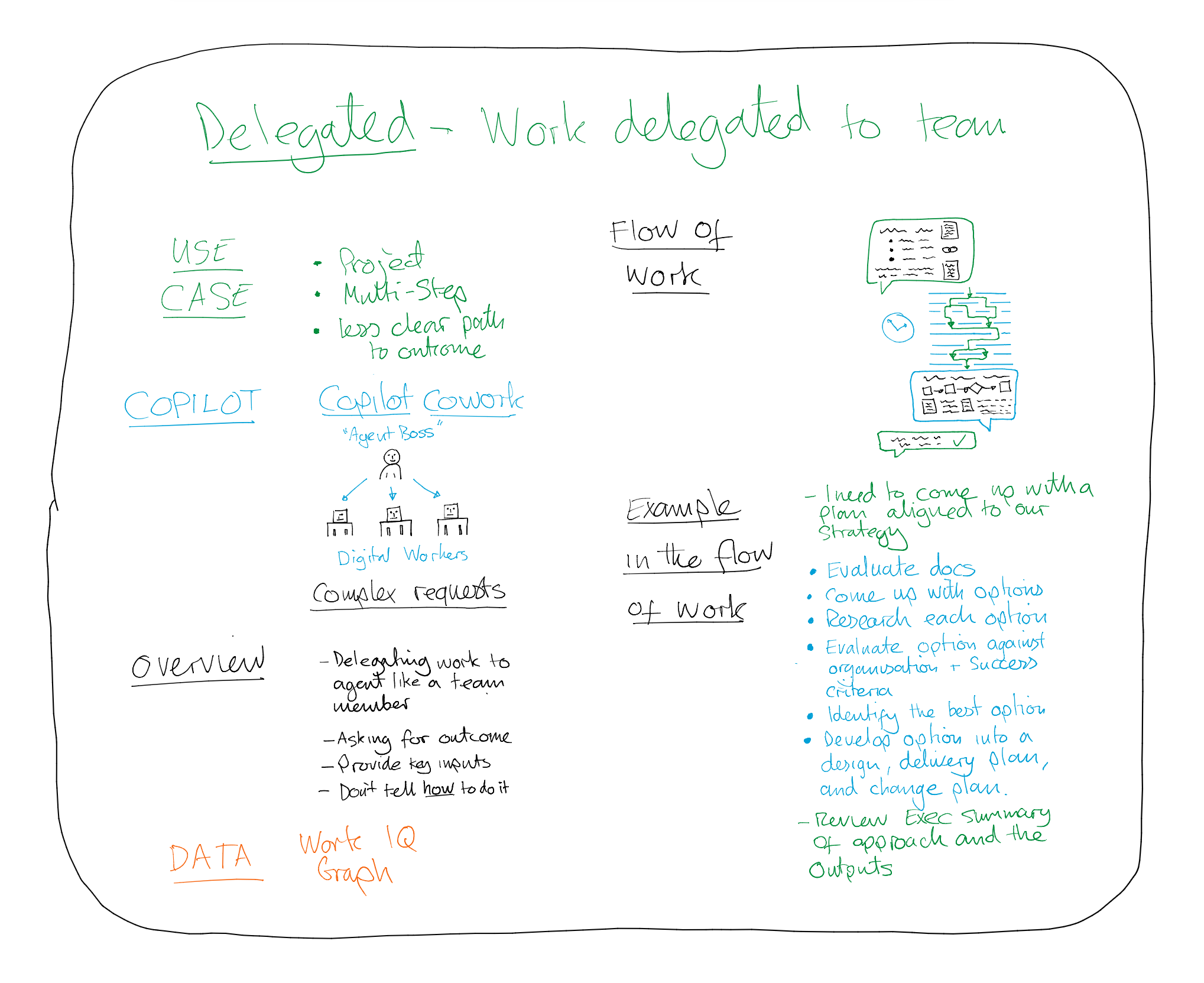
Battle card - Delegated Use Case - Copilot Cowork
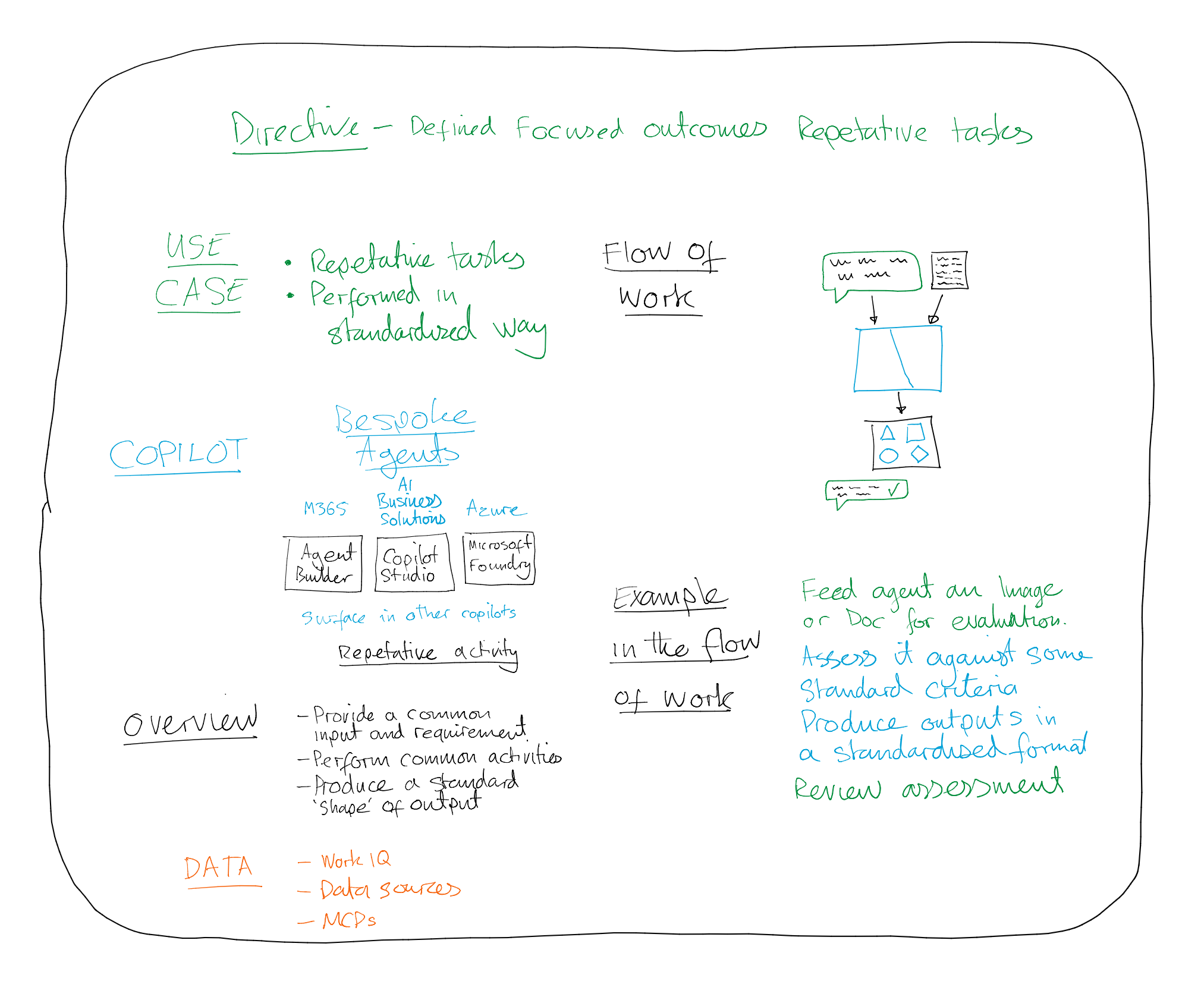
Battle card - Directive Use Case - Bespoke Copilot Agents
